
Delivering or receiving a BIM model is not enough. The real question, for those who produce it and those who receive it, is just one: does the model meet the requirements? Does it contain the information the specification demands, with parameters filled in and geometry coordinated across disciplines?
Answering that question is called IFC model validation, or model checking. It’s increasingly required by regulations and clients, and at the same time one of the most demanding activities: manually verifying hundreds of requirements across thousands of objects takes days of work and specialist software. In this article we look at what validating an IFC model means, what role IDS files play, and how deterministic artificial intelligence makes the process automatic and repeatable.
What IFC model validation means
IFC model validation is the systematic verification of a model’s compliance against a defined set of requirements. Checks fall into three main families.
Information checks. Does the model contain the required information? Does every object carry the correct classification, filled-in parameters (fire rating, thermal transmittance, WBS codes), values in the expected formats? This is the core of information requirements.
Geometry checks. Are the disciplines coordinated? Clash detection identifies physical interferences (hard clashes) and violations of minimum clearances (soft clashes) between architecture, structure and MEP.
Consistency checks over time. What changed between one delivery and the next? Comparing versions of the same model identifies new, deleted, modified or moved objects, and prevents revisions from introducing undeclared regressions.
Validation has two possible viewpoints. The contracting authority checks incoming models before accepting them. The design firm or contractor checks its own models before delivery, to avoid rework loops, non-compliance and delays.
The problem: requirements written for humans, checks done by hand
The paradox of traditional model checking is that requirements are born in a format machines don’t understand: the information specification. Documents dozens of pages long, in natural language, that someone must read, interpret and translate into concrete checks on the model.
The result is a slow, fragile process:
- translating requirements into verification rules is manual and open to interpretation;
- traditional model checking software is powerful but complex and expensive, and requires specialized roles;
- every update to the specification or the model means repeating the work;
- the outcome depends on who runs the check: two operators can get different results from the same model.
For public administrations the problem is even sharper: they receive IFC models because regulations require it, but rarely have the licenses and staff to actually verify them.
IDS: the bridge between specification and machine
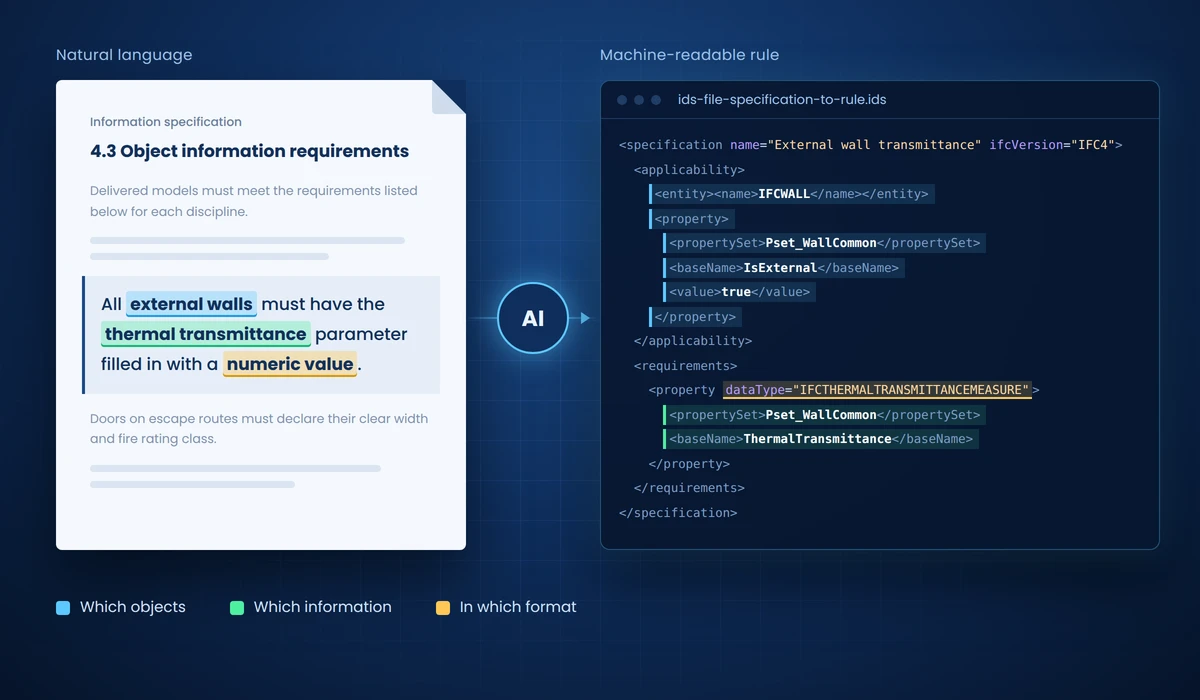
buildingSMART’s answer to this problem is called IDS (Information Delivery Specification): an open, standardized format that translates information requirements into machine-readable rules.
An IDS file describes, in a structured way, statements such as: “all external walls must have the thermal transmittance parameter filled in with a numeric value” or “every door on an escape route must declare its clear width and fire rating”. Each rule specifies which objects it applies to and which information must be present.
The advantage is twofold: requirements become unambiguous, because they’re written in a formal format, and automatically verifiable, because any standard-compliant tool can run the check on the IFC model and return an objective outcome.
One critical step remains: who writes the IDS? Turning a fifty-page specification into a set of formal rules is itself specialist work. And this is where artificial intelligence comes in.
Automation with deterministic AI: how CheckIFC works
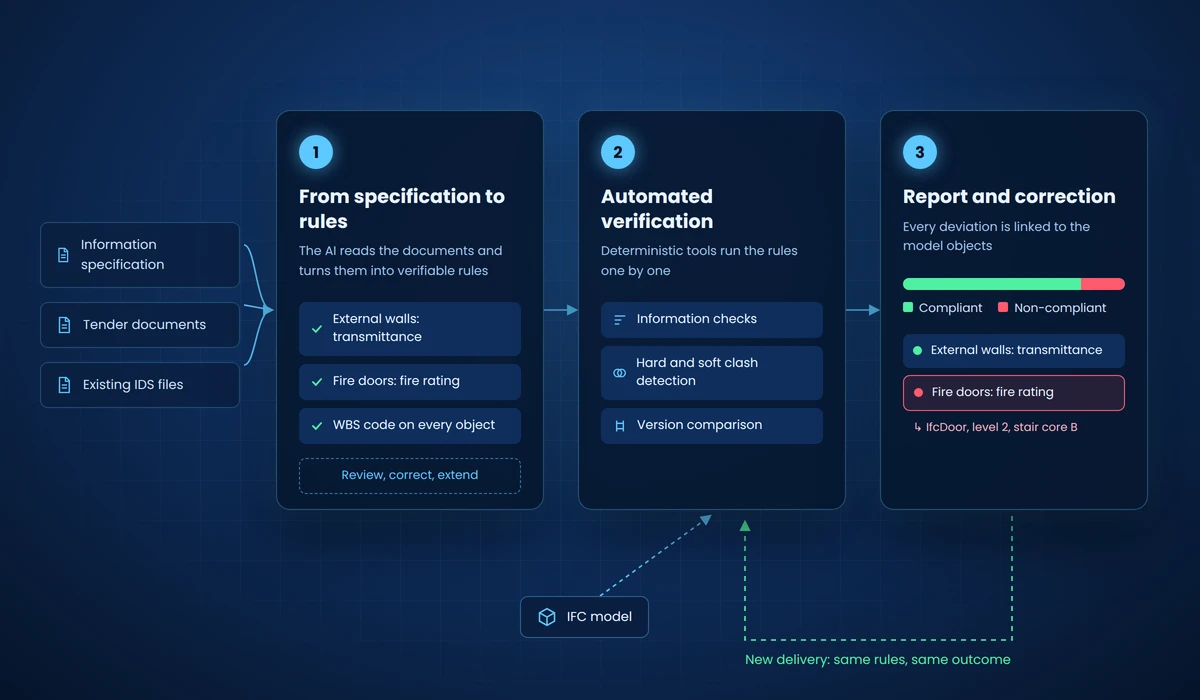
CheckIFC, EDBIM’s module for model verification and validation, automates the entire workflow, from document to report. The principle is the same across the whole platform: the AI doesn’t “judge” the model probabilistically. It interprets the documents and triggers deterministic software tools that run the checks. Same model, same rules, same outcome. Every time.
The workflow has three steps.
- From specification to rules. Upload the information specification or the tender documents. The AI analyzes them and turns them into a list of verifiable rules, which the user can review, correct and extend. Alternatively, import existing IDS files directly.
- Automated verification. CheckIFC runs the rules on the IFC model, one by one. Information checks are joined by clash detection (hard and soft, with user-defined tolerances and results aligned to market-leading tools) and model version comparison.
- Report and correction. The outcome is a clear report: compliant rules, non-compliant, to be fixed. Every deviation is linked to the affected objects in the model, so correction starts exactly where the problem is. The same rules are rerun on every new delivery, turning validation from a one-off task into a continuous process.
All of this without authoring licenses, without hyper-specialized staff, and with real governance: rules are visible, correctable and extensible by your internal admin.
The benefits, for those who deliver and those who receive
For contracting authorities: objective, documentable control over incoming models, without depending on external consultants for every check. The validation report becomes part of the acceptance process.
For firms and contractors: first-time compliant deliveries. Checking the model against the client’s own rules, before sending it, eliminates the rework loops that stretch timelines and erode margins.
For BIM coordinators: fewer clash-hunting meetings and more time for decisions. Clash detection, version comparison and information checks converge into a single repeatable workflow.
And validation is only reliable together with its natural complement: querying the model. To extract quantities and data from validated models, the reference is AskIFC, which we cover in our article on IFC quantity takeoff.
Frequently asked questions (FAQ)
What is an IDS file and what is it for?
IDS (Information Delivery Specification) is buildingSMART’s open standard that translates information requirements into machine-readable rules. It makes specification requirements unambiguous and automatically verifiable on IFC models.
Do I need to know how to write IDS files to validate a model?
With the traditional approach, yes, and it’s specialist work. With CheckIFC the AI generates the rules from the specification or tender documents; existing IDS files can still be imported directly.
Does automated validation replace the BIM manager?
No: it removes the repetitive part of the job. The professional defines and approves the rules, interprets the outcomes and decides the actions; the execution of the checks, which takes days by hand, becomes automatic and repeatable.
Are the results as reliable as traditional model checking software?
Checks are executed by deterministic tools: with the same model and the same rules, the outcome is always identical, and every non-compliance is traced back to the model objects. For clash detection, results are aligned with market-leading software.
Can a public administration use this approach without in-house BIM skills?
Yes, it’s one of the main use cases: the guided workflow requires no authoring licenses or in-house modellers, and information is accessible to non-technical staff as well. Data stays on dedicated European servers.
See validation live
The best way to evaluate automated model checking is to apply it to a real case: bring one of your specifications and an IFC model, and in a demo session we’ll generate the rules and the first validation report together.